Ask Marshall Site Features
An Easier, More Intuitive Way to
Search.
AskMarshall offers many unique and innovative features
and tools to help you get the information you need quickly and
easily.
Search Tools
 News
Search
News
Search
Find the latest news stories from around the world.
Sample Searches •
Top
Stories•
Football
News•
Tony Blair
NewsTry a news search for yourself
Search Tip:
You can browse today's
top
stories by clearing all text from the search box and by choosing the
"News" option. Search for news about a specific subject at any time by
adding the term "news" to your query.
Return to
Top
 Blogs
& Feeds Search
Blogs
& Feeds Search
Search the blogosphere using our unique
algorithm that combines Ask.com search technology and Bloglines
subscription data. We index the most popular blogs that people across the
web subscribe to daily to ensure higher-quality results and minimises blog
spam.
Sample Searches •
Slashdot•
Premiership
Football•
Climate
ChangeTry a blog search for
yourself
Return to
Top
Return to
Top
 Currency Converter
Use our simple on-line tool to
calculate currency conversions with more than 100 currencies at the latest
exchange rate.
Sample Searches •
Today's
exchange rates•
£100 in
$•
Online
Currency Converter for EurosTry currency
converter for yourself
Search Tip:
Enter the two currencies you would like to
convert or simply type "exchange rate" or "currency converter".
Return to
Top
 Smart
Answers
Smart
Answers
Ask.com Smart Answers provide key information right at
the top of the page. Smart Answers can be found on the web results page of
many searches, like for a band or famous person, and contain a brief bit
of information and links to more information. You can get quick access to
sports scores, movie times, weather, dictionary results, translation,
conversions, and more.
Sample Searches
•
Liverpool
FC•
Planet
Mars•
What's on
TV
Return to
Top
 Famous People Search
Find information about your favourite
celebrities and historical figures.
Sample
searches •
Elvis•
Muhammad
Ali•
Winston
ChurchillTry famous people search for
yourself
Search Tip:
Just enter the name of the famous person you
are looking for.
Return to
Top
Horoscopes Search
Find Your horoscope forecasts, romance
compatibilities and astrological profile...
Sample
Searches •
Horoscope•
Aquarius
Astrological ProfileTry horoscope search
for yourself
Search Tip:
Just enter the name of the horoscope you are
looking for or simply type the term "horoscope".
Return to
Top
 Dictionary & Thesaurus Search
Find quick definitions or
easily search online dictionaries, encyclopedias', thesauri and more.
Sample Searches•
Define
search•
Definition
of smart•
Synonym
of beautifulTry dictionary search for
yourself
Search Tip:
Just enter "define", "definition of",
"meaning of" or "synonym of" plus the word you are seeking.
Return to
Top
 Stocks
& Shares Search
Stocks
& Shares Search
Find up-to-date share prices and stock
market information for companies trading on the FTSE 100, AIM, Nasdaq and
Dow Jones exchanges.
Sample Searches
•
IACI
Stocks•
HBOS
Shares•
FTSE
IndexTry a stock search for
yourself
Search Tip:
Use a stock ticker symbol or the company
name plus the term "stock quote".
Return to
Top
 Music
Search
Music
Search
Find biography and discography information, download
pictures and find the latest products for all your favourite bands and
musicians.
Sample Searches •
The
Beatles•
Kings
of Leon Lyrics•
David
Gray biographyTry music search for
yourself
Search Tip:
Just enter the name of the band or musician
you are looking for.
Return to
Top
Recipes Search
Ask.com have partnered with Waitrose to
provide access to over 4000+ recipes. You can search for recipes within
various categories such as: course (eg. starter or dessert); a main
ingredient (eg. rice or pork), or a nationality (eg. French or
Italian).
Sample Searches •
Recipes•
Dessert
Recipesx•
British
RecipesTry a recipe search for yourself
Search Tip:
Enter either the course, main ingredient or
nationality plus the term "recipes".
Return to
Top
More Ask.com Tools
 MyStuff
The fast, free, and easy way to save,
organise and share your search results.
Sample Searches •
Save anything from the
Web - your search results, Web pages, images and
more.
•
Organise your saved items in folders, and
add notes for your reference.
•
Publish, blog, or
email your saved items. You choose whether you want to keep
MyStuff private or share on the Web.
•
Search
MyStuff and instantly 're-find' anything you've
saved.
•
Sign
up to
access your saved data from different
computers;
import your bookmarks or favourites, and
upload your pictures from your desktop or mobile.
Return to
Top
 Binoculars Site Preview
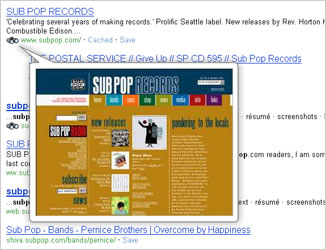 If you have broadband and want to avoid unnecessary trips
between your search results and the destination sites you are seeking,
then the Binoculars site preview tool is for you.
If you have broadband and want to avoid unnecessary trips
between your search results and the destination sites you are seeking,
then the Binoculars site preview tool is for you.
This feature
allows searchers to preview websites by simply mousing over the binoculars
icon within their search results. Easily figure out if you've found the
site you're looking for without having to leave uk.ask.com - saving both
time and energy.
Go to the Binoculars Site
Preview FAQ for more information.
Important Note: This feature is only available for
broadband-including DSL and Cable high-speed connections.
Return to
Top
Zoom: Related Search Terms
Narrow or broaden your search
with possible alternative search terms which appear on the right hand side
of the
Web and Images results page.
•
Narrow Your Search: helps you to drill
down into topics that are specifically related to your search
•
Expand Your Search: allows you to explore
topics that are conceptually related to your search
•
Related Names: presents a list of names that
are conceptually tied to topic options within the "Narrow Your Search" and
"Expand Your Search" lists
Return to
Top
 Automated Translation
Have you ever wondered what the Germans really do during the
Oktoberfest? Or what the French really put in their cuisine?
Now you can browse millions of foreign web sites without speaking the
language. Simply do a search of, say, Musee
du Louvre, and watch for the links that say [Translate this
Page] next to results in French. Click on these links and Ask.com
will translate automatically and instantaneously the entire site for you.
Browse, click around, and use all the features a French reader would.
Except that thanks to Ask.com, everything is now in English.

Curious about how we do that? Read the FAQ on Translation
Tool.
Return to
Top
Web Answers
For select queries Ask.com will deliver a direct answer response –
where a [Web Answer]
is shown for web search results. Just click on the more web
answers link and you will be provided with several different websites
containing the answer to your query.

Return to
Top
 Advanced Web Search
Advanced Search features allow you to
specify the type of web results you want. Try it out and see what the
Advanced Search features
can do for you.
Return to
Top
 Make
Ask.com Your Home Page
Make
Ask.com Your Home Page
Find what you are looking for faster by making Ask.com your home
page.
Follow the instructions below according to your web
browser.
Microsoft Internet Explorer
7.0 and under:
• Go to the "Tools" menu and choose
"Internet Options."
• On the "General" page, the first entry
reads, "You can change which page to use for your
homepage."
• Enter http://uk.ask.com/ into the space for
"Address" and click "OK."
If you're using Mozilla Firefox:
• Go to the "Tools" menu and choose "Options."
• On
the "General" tab, enter http://uk.ask.com/ into the space for
"Location(s)" and click "OK."
For Opera users:
• Go to
the "Tools" menu and choose "Preferences..."
• Go to the
"General" section and in the space for "Home page:", and enter http://uk.ask.com/ click
"OK."
If you're using Safari:
• Go to the Safari menu and choose "Preferences..."
• Go to the "General" section and in the space for "Home page:",
and enter http://uk.ask.com/
• Close the Preferences window.
For Netscape Navigator or Communicator:
• Go to the "Edit" menu and choose "Preferences."
• At the top of the Preferences box, you will find "Navigator
Starts With" along with three options. Click on the button to the left of
the "Home Page" option.
• Further down, the box reads, "Clicking
on the Home button will take you to this page."
• Below, at
"Location," enter http://uk.ask.com/ and
click "OK."
Return to
Top

 Image
Search
Image
Search Shopping Search
 Map &
Directions Search
Map &
Directions Search Weather Search
 Video Games Search
  Movie
Search
Movie
Search Conversions Search
 Search
Toolbar
Search
Toolbar
